Farther apart · GPS
Plus · finder only
A shared spot.
A place to start.
When both phones are online, a Plus finder sees a permitted spot with its age and accuracy, then follows a map or an arrow toward it.
How shared spots workMade for the moment
The crowd moves. Plans change. Find a trusted person and get back to the day.
See how you reconnectNearby Bluetooth finding is free for everyone. The GPS bridge, Wi-Fi distance and compatible UWB precision are Plus features for the finder. The person being found never needs Plus.
From farther apart to nearby
You never pick a technology. Whether you start far apart or close by, the app guides you the whole way.
Farther apart · GPS
Plus · finder only
When both phones are online, a Plus finder sees a permitted spot with its age and accuracy, then follows a map or an arrow toward it.
How shared spots workGetting closer · Bluetooth
Standard · free for everyone
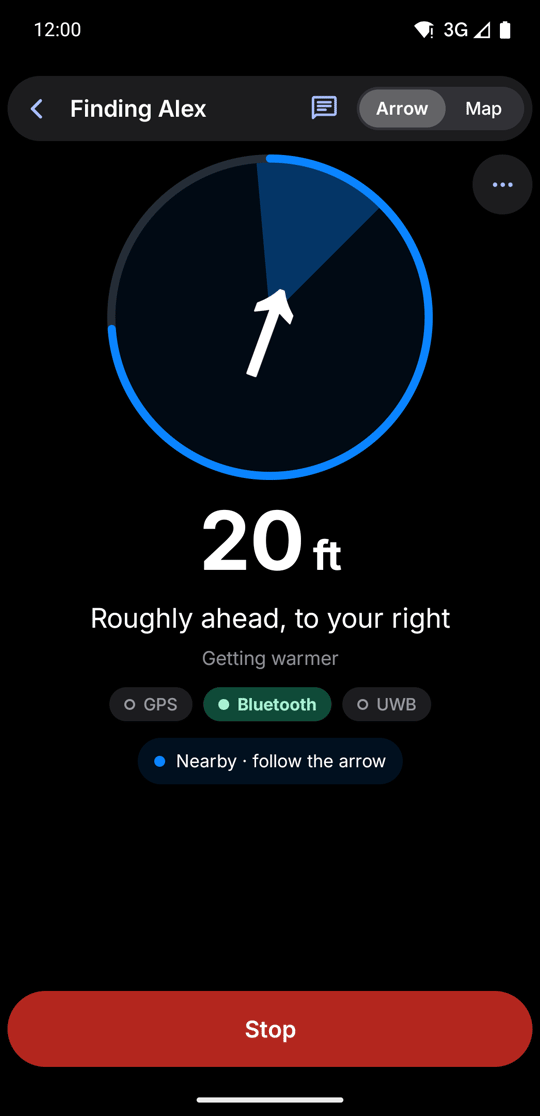
Nearby finding is free for both phones. As you get closer, the arrow guides you in.
Nearby finding works offline after setup.
Final stretch · Compatible UWB
Plus · compatible phones
On supported phones, a Plus finder gets precise nearby distance. Both phones need the hardware.
Check phone compatibilityNearby distance is usually an estimate. With Plus, Wi-Fi distance can give a measured distance on supported Android 13+ phones. Walls, crowds and phone settings can affect every connection.
In short: Standard is free and includes one trusted connection with Bluetooth finding. Plus adds GPS finding, Wi-Fi distance and compatible UWB precision on phones that support them, more trusted people, Group Find, offline maps, and saved messages. Compare Standard and Plus.
The part you actually look at
Partner Finder shows the best guidance your phones have, and tells you how much to trust it.
While the phones connect
From the moment you tap Find, the connecting screen tells you what is happening.
A snapshot, only during a Find
Plus · finder only
Allow GPS access for one trusted person when setting up the connection. There is no repeated approval while that permission stays active.
Both phones need internet. Only the finder needs Plus. A shared point can be out of date if the person moves.
Groups
Plus
Save the people you go out with as a group. Each card shows who is nearby.
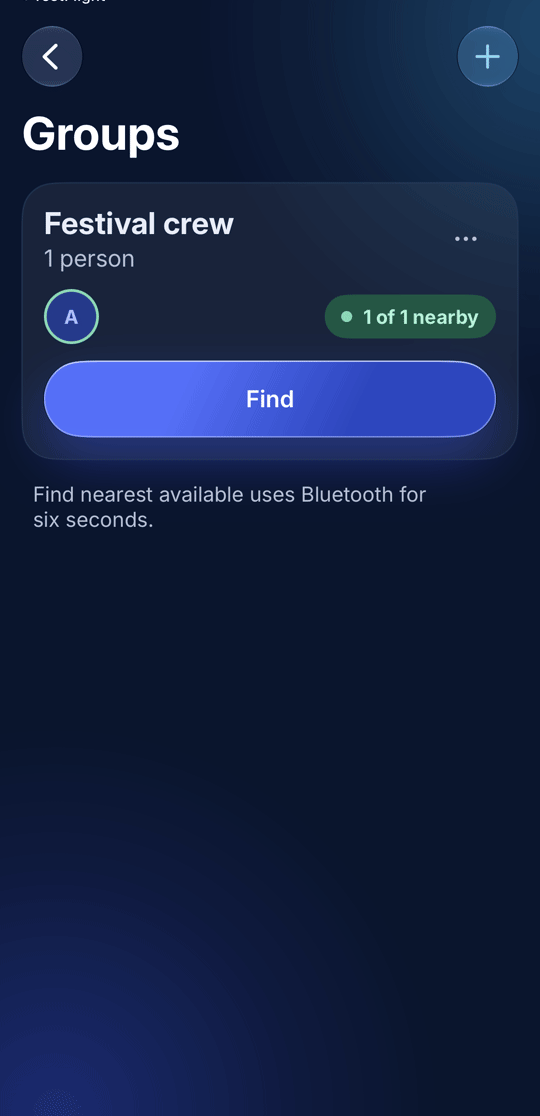
Ready for a full day out
Plus
Group Find works with one to three people you explicitly select. Each keeps a separate consent decision, session, status and Stop control.
Standard and Plus
Once your phones are connected nearby, send a short message during a Find, for when a crowd makes calling hopeless. It stays between the two phones and the people you chose. With Plus, the Messages screen keeps the conversation.
Watch app not available yet
A Wear OS watch app that shows the arrow and distance on your wrist during a Find is not available yet. For now, the phone shows them.
Plus
Offline map downloads let you save an area before you go. They save the map, not a connection to the other phone.
Standard and Plus
Review recent Find requests and how each one ended. The list can be incomplete: Finds recorded in Nearby-only mode stay on the phone that recorded them, and a request your phone never received is not on it.
Standard: one person · Plus: more
Standard includes one trusted connection; Plus adds more. Remove someone to end their access, even before their phone gets the update. Locations they already saved cannot be erased from their phone.
Family Access
Available from age 13. Ages 13–17 set up with a parent or legal guardian, who approves the teen’s connections with other people.
A guardian accepts the terms and completes setup with the teen. The app asks for an age range, never a birth date.
During a Find, the teen chooses whether to share. People other than current guardians also need a guardian’s approval. When this feature is available in your app, an eligible guardian with their own Plus can also request a map outside a Find. That view has its own rules, set out in the Guardian Addendum.
A guardian can sponsor Plus and end Family Access at any time. Teen accounts cannot buy Plus directly.
Ending Family Access and cancelling a Google Play subscription are separate actions. Read the Family Access questions.
Stay connected. Stay in control.
A Find shares your location for a limited time, and you can stop sharing during the Find. Partner Finder is not an emergency service or a guarantee of finding someone.